Setting up Expiry Futures on OKX in Singapore


Here's how to set up your Expiry Futures trade on OKX in Singapore.
Step 1: Navigate to Futures
Open the OKX app.
Tap Trade, or the GRID button at the top left, and then select Futures.
Step 2: Entering Expiry Futures
Click the trading asset pair and press the “ALL” button on the side bar.
Click on Expiry
Step 3: Choose your Expiry Contracts Pair
Browse available contracts. Each contract shows its settlement date.
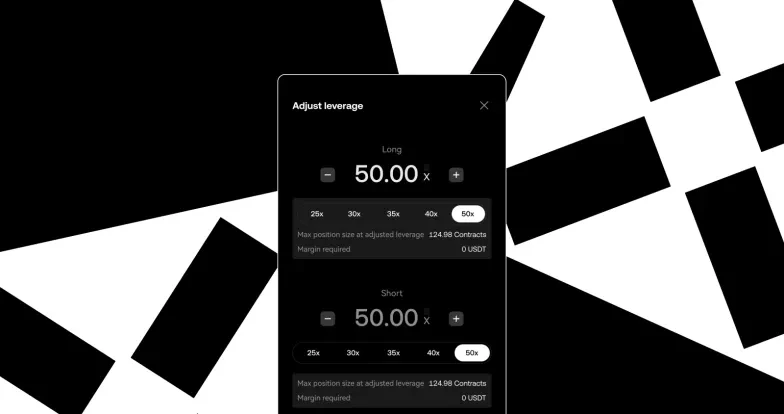
Step 4: Set Leverage
Tap the leverage icon (e.g., 20×) next to the order form.
Adjust the leverage level using the slider or input field.
Choose between Isolated or Cross Margin modes.
Step 5: Open a Position
Tap “Buy/Long” if you expect the price to rise, or “Sell/Short” if you expect it to fall.
Review the order summary and tap Confirm to place your trade.
Step 6: Monitor and Manage Your Position
After placing the order, monitor your open positions in the “Positions” tab.
You can adjust TP/SL (Take Profit / Stop Loss) or close the position manually at any time.
Expiry Futures trading is currently available only to Accredited Investors in Singapore. Verify as an Accredited Investor now, and gain access to Spot Margin
© 2025 OKX. Dit artikel kan in zijn geheel worden gereproduceerd of verspreid, en het is toegestaan om fragmenten van maximaal 100 woorden te gebruiken, mits dit gebruik niet commercieel is. Bij elke reproductie of distributie van het volledige artikel dient duidelijk te worden vermeld: 'Dit artikel is afkomstig van © 2025 OKX en wordt met toestemming gebruikt.' Toegestane fragmenten dienen te verwijzen naar de titel van het artikel en moeten een bronvermelding bevatten, zoals: "Artikelnaam, [auteursnaam indien van toepassing], © 2025 OKX." Sommige inhoud kan worden gegenereerd of ondersteund door tools met kunstmatige intelligentie (AI). Afgeleide werken of ander gebruik van dit artikel zijn niet toegestaan.